Tabularis

An open-source, MCP-native desktop database client for modern databases and AI agents.

Screenshots & Images
Overview

Tabularis is a free, open-source desktop SQL workspace for developers and teams that combines a modern Monaco SQL editor, data grid, visual query builder, SQL notebooks, and a plugin-based engine ecosystem. It supports PostgreSQL, MySQL/MariaDB, SQLite out of the box and many more engines via language-agnostic plugins. With a built-in MCP server, Tabularis enables compatible AI agents to inspect schemas and run queries securely, while maintaining a local-first workflow with SSH tunneling and system keychain storage.

Description

Tabularis — Open-Source Desktop SQL Workspace

Tabularis is a modern, open-source desktop client for working with databases. Built as a fast, secure, and extensible environment, it puts powerful SQL tooling in a single place—designed for today’s workflows where humans and AI agents collaborate on data.


Why Tabularis

  • Open-source, Apache 2.0 licensed
  • Desktop-first experience that keeps your data on your machine
  • Multi-engine support out of the box, with additional engines via plugins
  • MCP-native: an integrated Model Context Protocol server lets AI agents inspect schemas and run queries safely inside Tabularis

Core workflow

  • Install, connect, and get productive quickly
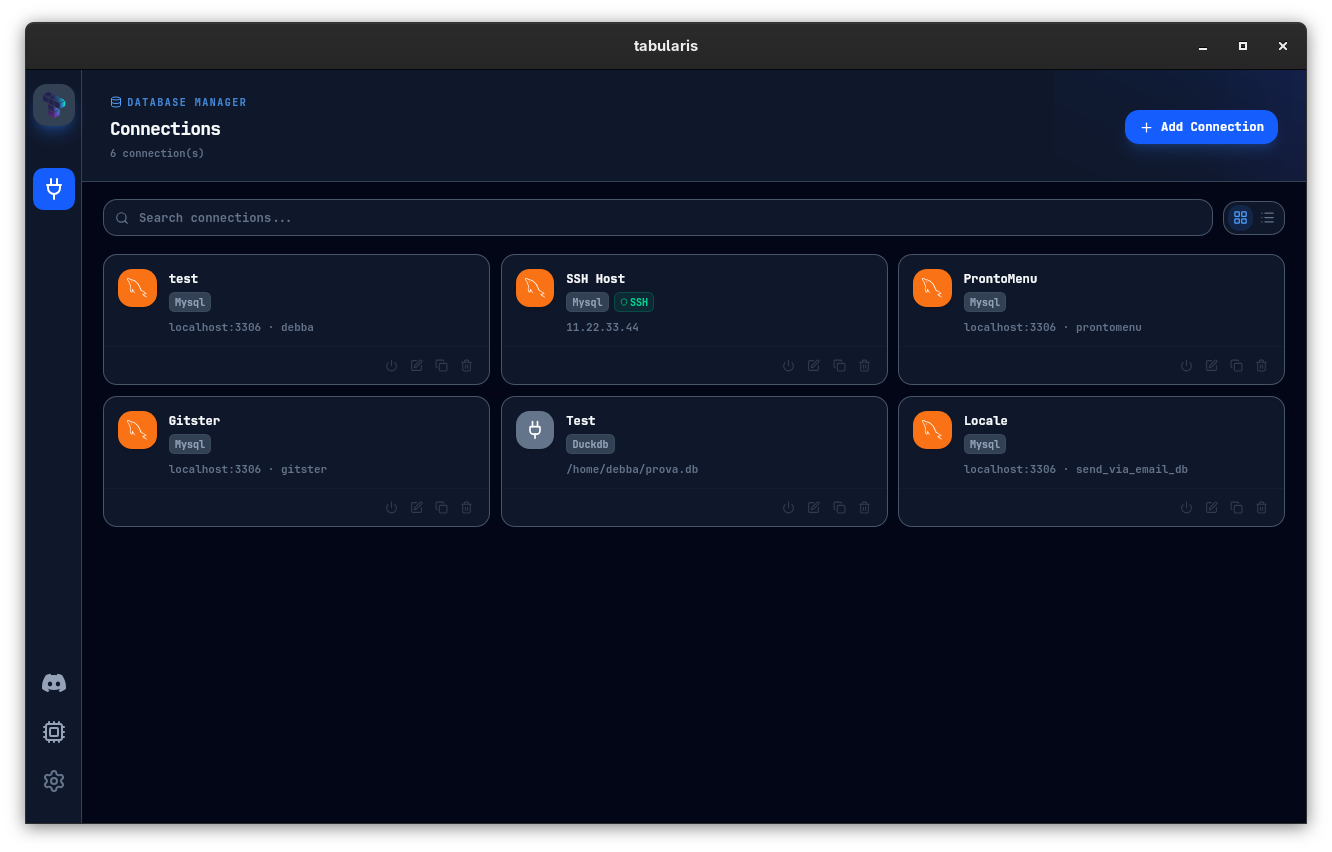
  • Manage multiple connections from a single app
  • Rich editor, data grid, and visual tooling that work together
  • AI-assisted workflows that stay inside your environment and protect credentials

Key features

  • Multi-Database Support: Work across PostgreSQL, MySQL/MariaDB, and SQLite with one consistent interface; expand with community plugins.
  • Modern SQL Editor: Monaco-based editor with tabs, history, syntax highlighting, and precise execution controls.
  • Data Grid: Inspect, filter, and edit result sets inline; edit rows, copy selections, and export to JSON/CSV in one flow.
  • SQL Notebooks: Reusable SQL + Markdown notebooks with inline charts, variables, and parameters for repeatable analytics.
  • Visual Query Builder: Build joins and filters visually, then inspect the generated SQL.
  • Visual EXPLAIN: Turn execution plans into interactive graphs and tables; AI suggestions help pinpoint costly operations.
  • ER & Schema Tools: Inline table/column editing, guided schema dialogs, and interactive ER diagrams.
  • Task Manager: Monitor plugin processes in real time, with controls to restart or kill as needed.
  • SSH Tunneling & Security: Reach remote databases securely; secrets stay in your system keychain.
  • Split View: Open multiple connections side by side in a resizable layout for quick comparisons.
  • SQL Dump & Import: Export full SQL dumps and re-import with guided flows for backups and migrations.
  • AI Assistant (Experimental): Draft, explain, and refine SQL with providers you trust (OpenAI, Anthropic, OpenRouter, Ollama).
  • MCP Server: Use the built-in MCP server to let compatible AI tools read schemas and act on databases through Tabularis.
  • Plugins Ecosystem: Extend engines and workflows via JSON-RPC plugins; hot-install without restarting the app.

Platform & architecture

  • Rust + Tauri backend, React 19 frontend
  • Native desktop experience with robust security and offline usability
  • Local-first design: data and credentials stay on your device; supports SSH and keychain storage

Extensibility and ecosystem

  • Plugin-driven database workflows: add drivers and integrations without changing the core
  • Plugin registry includes DuckDB, CSV Folder, Redis, and many more
  • Bounty Board to fund new drivers and features, bringing community-driven growth

Use cases

  • Developers and DBAs who want a modern, capable SQL workspace
  • Teams requiring secure, local-first access with easy collaboration through shared workflows
  • AI-powered data work: safe schema access and query execution inside a trusted desktop app
  • Data analysts building notebooks and visual analyses that stay connected to live databases


Features
Pricing
User Reviews
1,247 reviews
MK
Marcus K.
✔ Verified·SaaS Founder·Used 2 years
4.8
★★★★★
Overall
Ease of use
4.0
Features
5.0
Performance
4.5
Value
4.8
Support
4.5
Scalability
4.8
Plugins
5.0
Built my entire SaaS on Bubble — $40k MRR now

I was skeptical about no-code but Bubble proved me wrong. I built a B2B client portal with complex permissions, Stripe billing, and real-time notifications. The learning curve is real — give yourself 2–3 weeks — but once it clicks, you're unstoppable. Performance has been solid at our scale.

SaaSB2BStripe
SP
Sara P.
✔ Verified·Designer → Builder·Used 8 months
3.9
★★★★☆
Overall
Ease of use
2.5
Features
5.0
Performance
3.0
Value
4.0
Support
4.5
Scalability
3.5
Plugins
4.5
Incredibly powerful, but the learning curve is steep

Coming from Webflow, Bubble felt overwhelming at first. The editor UX isn't as polished, and performance on complex apps can feel sluggish. That said, nothing else lets you build a full database-driven app without code. The community forums are excellent — almost every problem has been solved by someone.

Webflow migrantDesign
JL
James L.
✔ Verified·Product Manager·Used 3 months
3.1
★★★☆☆
Overall
Ease of use
3.5
Features
4.5
Performance
3.0
Value
1.5
Support
3.0
Scalability
2.5
Plugins
4.0
Great for MVPs, but pricing scales poorly

Used Bubble to ship our MVP in 6 weeks, which was genuinely impressive. But once we needed real capacity, the jump from Growth to Team ($29 to $529/mo) was brutal for a bootstrapped startup. The server unit model is also confusing to reason about. Would love a mid-tier option.

MVPPricing concernBootstrapped
Community Showcases

Real apps built with Bubble by the community. Click any card to see full details.

NomadDesk
Remote workspace booking marketplace
🔥 142💡 89✨ 204
$14kMRR
GrantHive
Grant management SaaS for nonprofits
🔥 98💡 211✨ 76
StudyBuddy82%
StudyBuddy
AI-powered study planner mobile app
🔥 317💡 155✨ 430
RecruitFlowMK
RecruitFlow
Applicant tracking system for SMBs
🔥 67💡 188✨ 55
EventForge847attendees$42krevenue
EventForge
Event ticketing & management platform
🔥 231💡 142✨ 189
CourseForge
CourseForge
Online course platform with analytics
🔥 178💡 302✨ 144
Latest Updates
Mar 2025
Major
AI Autocomplete in Workflow Editor

Bubble now suggests the next workflow action based on your current logic using an embedded AI assistant — dramatically speeds up building complex multi-step flows.

Feb 2025
Improvement
Responsive Engine 2.0

Completely redesigned responsive layout system with per-breakpoint controls. Existing apps auto-migrate with one-click. Mobile apps now build 3× faster.

Jan 2025
Major
Native Git-style Version Branches

Team plan subscribers can now create development branches, make changes in isolation, and merge them back — similar to Git branching. Long requested by professional teams.

Dec 2024
Fix
Database Performance Improvements

Fixed significant performance degradation on apps with 1M+ rows caused by query planner regression. Apps now load 40–60% faster under heavy data loads.

Nov 2024
Improvement
Improved Plugin API v3

Rebuilt plugin API with TypeScript support, better error handling, and a new sandbox testing environment. Developer documentation fully rewritten.

Frequently Asked Questions
Tabularis is an open-source desktop SQL workspace and database client that supports PostgreSQL, MySQL/MariaDB, SQLite and many more engines via plugins, with built-in MCP support for AI agent integration.
Tabularis provides desktop builds for Windows, macOS, and Linux (distributed via GitHub releases, Homebrew, WinGet, Snap, and AUR).
Yes — Tabularis is free and open source under the Apache 2.0 license; the source code and releases are available on GitHub.
Built-in drivers include PostgreSQL, MySQL/MariaDB, and SQLite; additional engines (DuckDB, ClickHouse, Redis, Firestore, and many more) are available via the plugin system.
MCP (Model Context Protocol) support in Tabularis lets compatible AI agents inspect schemas and run queries through the app securely, so agents can operate against your database without leaking credentials into chat windows.
Yes — Tabularis supports an external plugin system (JSON-RPC over stdin/stdout). Plugins can be written in Rust, Go, Python, Node.js or any language that speaks JSON-RPC, and they run in isolated processes.
Links
ToolStack Verdict
9.1
Exceptional

Bubble remains the gold standard for full-stack no-code development. The power ceiling is unmatched — if you're willing to climb the learning curve, you can build virtually anything. Best for ambitious founders and product teams.

Pros

  • Full-stack in one tool
  • Huge plugin ecosystem
  • Real-time features built-in
  • Thriving community

Cons

  • Steep learning curve
  • No code export
  • Performance at scale
  • Pricing jump is large
Quick Facts
Founded2012
HeadquartersNew York, USA
Funding$100M+ (Series A)
Users4M+ builders
Apps built2M+ total
Free planYes
Pricing from$29/mo
CategoryVisual App Builder
Mobile appsWeb only
Open sourceNo
Last reviewedMar 2025
Best For
SaaS MVPs & startups
Marketplaces & directories
Client portals & dashboards
Community platforms
Native mobile apps
Static marketing sites